
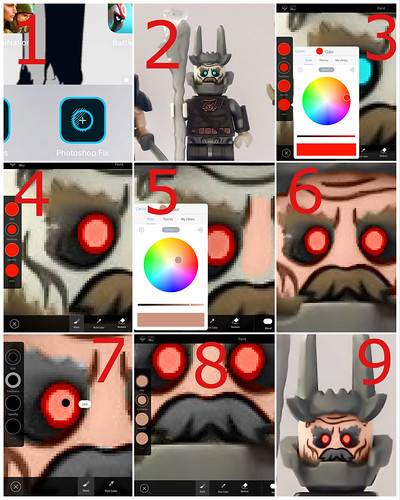
Hey guys and gals, so a few of you have asked how I change the colour of my characters in my pictures. So here’s a little tutorial on how I do it (please note this is a free app on IOS). Oh and this took me 30 seconds since I was just doing a quickie to show y’all so no judging! XD
1. Go into the app "Photoshop Fix" then onto "paint" at the bottom
2. Select your photo you want to edit
3. Select the colour you want and it will blend it in rather than overlap it
4. Apply colour (you can adjust it to be darker or lighter)
5. Pick the colour and try it out by making it darker or lighter because it will change and not look right if your applying it on a different colour.
6. Me going around the features with black to make them stand out
7. Adjusting size of the paintbrush to get in all those little nooks
8. Applying the skin colour over the paint which went over the lines
9. Checking it out
Posted by Lego Creationist on 2017-07-31 19:17:25
Tagged: