

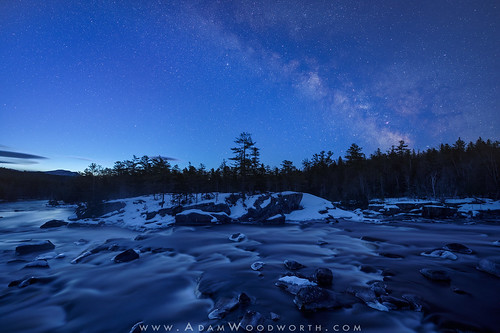
The Milky Way during astronomical twilight in northern Maine, with those lovely blue tones.
Nikon Z 6 with NIKKOR Z 14-24mm f/2.8 S lens @ 14mm and f/2.8 for all shots.
Sky: Star stack of 23 exposures each at 10 seconds, ISO 6400.
Foreground: Single 4 minute shot at ISO 1600.
The raw files for the sky were stacked in Starry Landscape Stacker (Mac only, use Sequator on Windows) for spot stars and low noise. I did some basic edits on the resulting file in Lightroom Classic before blending it with the foreground exposure in Photoshop. The foreground exposure raw file was prepared in Capture One to workaround a fatal flaw in Lightroom Classic — the inability to disable lens distortion correction profiles that are embedded in the raw files of many mirrorless cameras. This flaw forces the distortion correction on your raw files no matter what you do in Lightroom Classic. A recent update to Lightroom Classic allows disabling of these profiles in new mirrorless cameras, but not for the raw files of my Z 6 or Z 7. The distortion correction is, of course, ultimately a warping of the image. Since the raw files for the sky were processed in Starry Landscape Stacker, which ignores such embedded profiles, the resulting sky image does not have the warping applied. So in order to easily align the sky result with the foreground exposure you have to somehow get around this stupid problem with Lightroom Classic. You can covert the foreground raw file to DNG, strip the embedded profile, and re-import to Lightroom, or just use a different raw editor for the foreground that doesn’t force embedded profiles. I’ve been using Capture One for this purpose for two reasons — disabling of the embedded profiles, plus Capture One’s “Single Pixel” slider for removing hot pixels is the best tool for easily removing most hot pixels in any raw editor I’ve tried. This means I often skip in-camera long exposure noise reduction and just let Capture One do the hot pixel reduction for me, and then I clean up what’s left manually or using Dust & Scratches in Photoshop. Note that if I was using single shots for the sky I would use Long Exposure Noise Reduction in that case, as it will be easier to remove hot pixels with a dark frame to separate hot pixels from the stars.
Visit my website to learn more about my photos and video tutorials: www.adamwoodworth.com
Posted by Adam Woodworth on 2021-03-28 16:59:40
Tagged: , maine , milky way , mt. katahdin , new england , night , rapids , river , sky , stars , twilight