

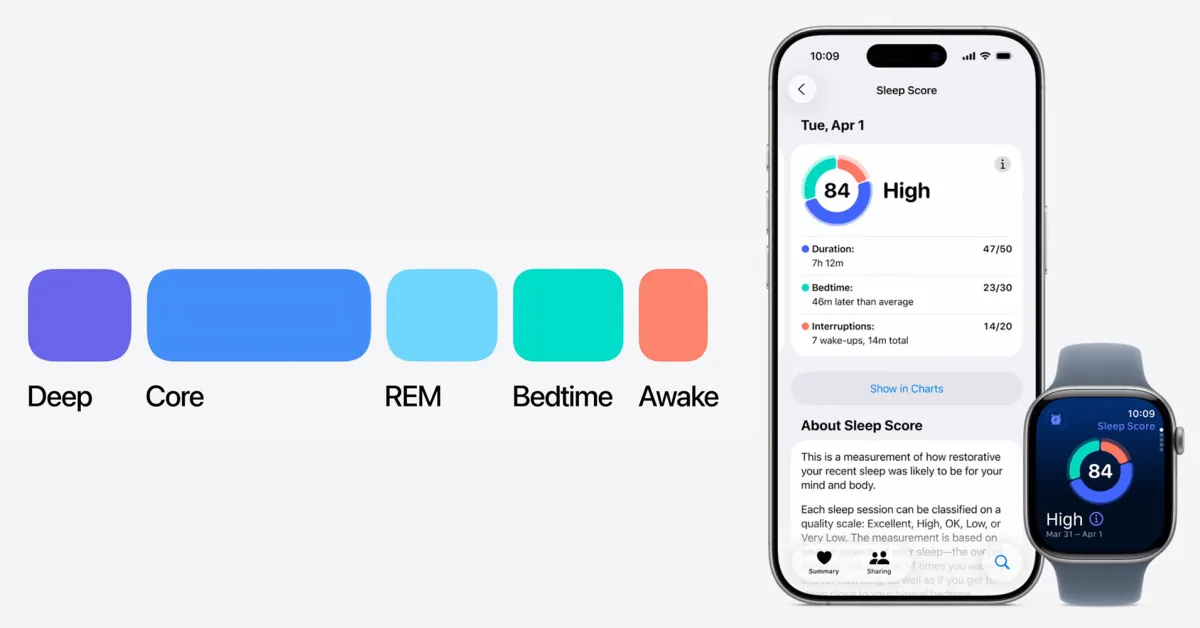

One of my favorite Apple Watch features introduced this year is Sleep Score. Sleep is a crucial part of life, and this feature gives you a look at three different facets of it: duration, bedtime, and interruptions.
With this week’s launch of iOS 26.2 and watchOS 26.2, it just got even more useful.
Sleep Score in iOS 26.2
It’s no secret the initial implementation of Sleep Score in iOS 26 and watchOS 26 was … a bit too forgiving. There were multiple days where my body told me I didn’t sleep well the night before, but my Apple Watch instead my sleep quality “OK” or “Good.”
In watchOS 26.2 and iOS 26.2, however, Apple has reclassified the Sleep Score levels in response to this feedback.
iOS 26 and watchOS 26 levels:
- Very Low: 0-29 points
- Low: 30-49 points
- OK: 50-69 points
- High: 70-89 points
- Excellent: 90-100 points
iOS 26.2 and watchOS 26.2 levels:
- Very Low: 0-40 points
- Low: 41-60 points
- OK: 61-80 points
- High: 81-95 points
- Very High: 96-100 points

As is the case with most Apple Watch features, Sleep Score data is only as useful as you make it. If you track your sleep, collect the data, but don’t take action with it, then the feature isn’t very useful to you.
For me, it’s shown me that I tend to wake up more often than I thought overnight. I’m still exploring ways to improve this, but it’s something I hadn’t realized before.
Among the things I’ve tried include cutting out coffee after 12 p.m., trying to eat dinner a bit earlier most nights, and making sure I’m not getting in bed too early only to wind up scrolling on TikTok for an hour before I’m ready to sleep.
I wish Apple was more proactive in telling me how to improve my Sleep Score. It gives you specific information on the duration of my sleep, my bedtime, and interruptions, but it stops short of really offering tips on what to do about those numbers.
Ultimately, I’m glad to see Apple actually acknowledge that people sleep while wearing Apple Watch and integrate that data into the Health app with actionable information. In the past, you got very little benefit from sleeping with your Apple Watch without using a third-party app.
Another interesting thing about the Sleep Score feature is that it doesn’t require an Apple Watch. It works with any accessory or app that syncs data to the Health app.
For example, I’ve recently started testing out the Oura Ring 4. Even when I wear it during sleep instead of my Apple Watch, the Health app still gives me a Sleep Score everyday.
Do you use the Sleep Score feature in iOS 26.2? If so, have you learned anything interesting? Let us know down in the comments.
My favorite Apple Watch links:
Follow Chance: Threads, Bluesky, Instagram, and Mastodon.
FTC: We use income earning auto affiliate links. More.