

Too many projects. Too many moving parts. Not enough structure. Sound familiar? That’s modern project management.
Between status changes, shifting deadlines, stakeholder updates, and files spread across platforms, even high-performing teams hit walls. monday.com was designed to change that.
As a leading project management tool, monday.com helps your entire team plan, track, and manage complex projects with greater efficiency.
Its project management templates are customizable, built for speed, clarity, and real-life execution. Each template includes structured boards, columns, calendar integrations, Gantt charts, and automations to keep projects organized and consistent.
You can assign tasks, visualize dependencies, set deadlines, and leverage data for performance tracking—all without starting from scratch. From small teams to cross-functional groups, monday.com makes it easier to manage workloads, ensure alignment, and hit your key milestones.
If you’re tired of rebuilding your process every time a new initiative starts, this is your sign to stop reinventing the wheel.
Choose a project management template that’s designed to grow with you, not against you. ⬇️⬇️⬇️
How Does monday.com Support Project Management?
monday.com is a project management tool that teams worldwide use daily to manage tasks, track existing projects, and collaborate with their colleagues.
For many remote and distributed teams, it serves as the central work hub to maintain communication on active projects and ensure deadlines are met and tasks are completed.
Here are just a few things teams use project management templates to push projects forward faster:
- Shared boards to manage multiple projects
- Assign team members tasks and follow real-time updates
- Utilize automation to reduce manual work
- Drill down into specific project milestones
- Add files, notes, and important documents to a shared workspace
These templates are customizable, so team leaders can focus on creating a project management system that fits their workflow.
10 monday.com Project Management Templates for 2026
Why start from scratch when you can start with a ready-made template? monday.com works with teams to learn what works, how these templates are incorporated into a pre-existing workflow, and opportunities to improve these templates over time.
Simply put, these monday.com templates aim to set your team up for success, collaborate more effectively, and increase individual productivity.
They’re built to help you stay on top of status updates, streamline communication, and manage even the most complex projects with confidence.
1. Project Management Plan Template
🏅 Best for: Project managers who need an all-in-one solution to kick off and track a project.

This template provides a high-level and detailed view of a project, including objectives, timelines, deliverables, stakeholders, budgets, and risks.
Each task is broken into manageable phases, with clear assignees and deadlines. It also includes space for notes, documentation, and progress updates.
Why this is effective: It reduces ambiguity by giving everyone on your team one place to plan, manage, and communicate.
Project Management Plan Template
Pro-Tip: Set up status automations so the project phase updates automatically when all tasks in a group are marked complete.
2. Workflow Template
🏅 Best for: Teams struggling with inconsistent processes or unclear task handoffs.

This template helps create a repeatable process for your team, ideal for onboarding, content production, or development cycles.
Tasks move through visual stages like “To Do,” “In Progress,” “Review,” and “Done” with customizable columns for deadlines, owners, files, and status.
Why this is effective: It brings structure to recurring processes, so no step is missed and responsibilities are crystal clear.
Pro-Tip: Use board filters to create department-specific views and keep everyone focused on their role in the workflow. It’s also a great tool to improve team collaboration.

3. Meeting Agenda Template
🏅 Best for: Managers who want to stop wasting time in unproductive meetings.
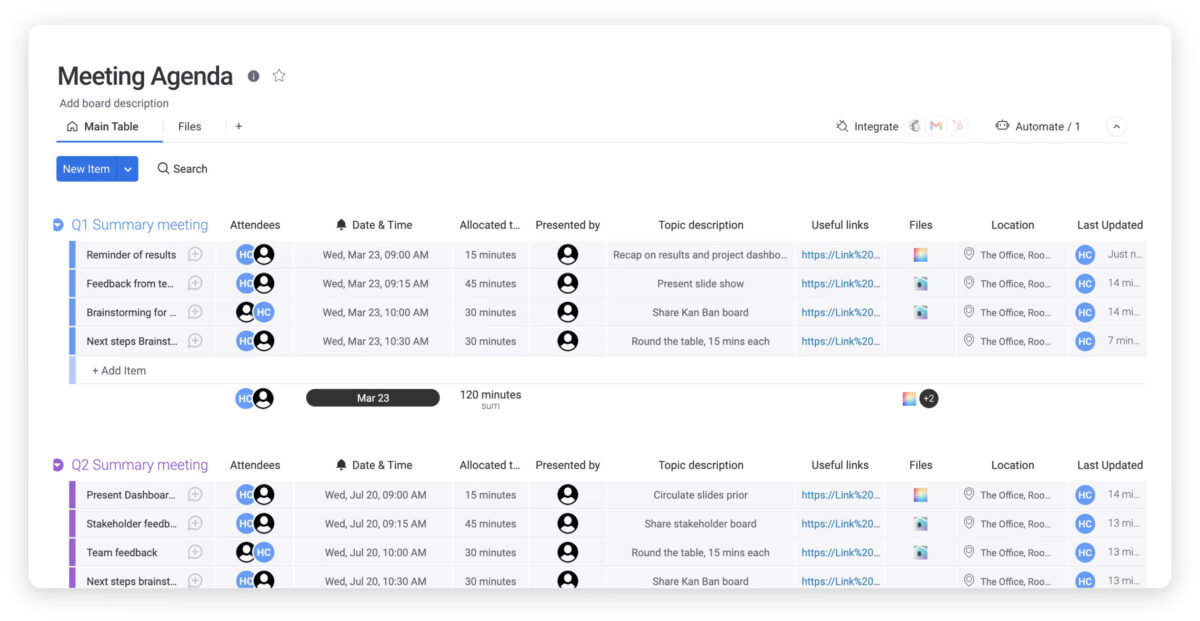
This board turns meetings into goal-driven conversations.
Create agenda items with owners, prep notes, and outcomes. Use time-blocking columns to control the pace of your meetings and add post-meeting follow-ups so everything discussed gets tracked.
Why this is effective: It improves transparency and ensures your team doesn’t leave meetings wondering, “Wait, who’s doing what?”
Pro-Tip: Turn recurring meetings into recurring templates so the structure stays consistent week to week. Consider syncing with online project management tools for smoother integration.
4. Action Plan Template
🏅 Best for: Teams who need to turn strategy into execution, fast.

Turn quarterly goals or big ideas into clear action steps. Organize by initiative, break tasks into subtasks, and assign priority levels and dependencies. Use the Timeline View to visualize your plan from start to finish.
Why this is effective: Everyone knows what’s next, what’s blocked, and how their work ties into the bigger picture.
Pro-Tip: Leverage automations to alert team members when dependent tasks are completed. If you’re feeling stuck, work planning templates can help kickstart momentum.
5. Single Project Template
🏅 Best for: Project owners managing short-term or one-off projects.

This board keeps your short-term project on track with defined goals, deliverables, due dates, and assignees. Use Timeline and Calendar Views to monitor milestones. Color-coded labels help visualize progress.
Why this is effective: It focuses your efforts on getting things done without extra noise. For specific projects that require a lot of individual focus, a specific project template can ensure that all milestones are reached on time.
Pro-Tip: If you want to make tweaks to an existing template, you can save your own version as a custom template to use consistently or if you have projects that are repeated throughout the year. This helpful YouTube video has a ton of useful tips:
6. Project Requests and Approvals Template
🏅 Best for: Teams overwhelmed by incoming project requests.
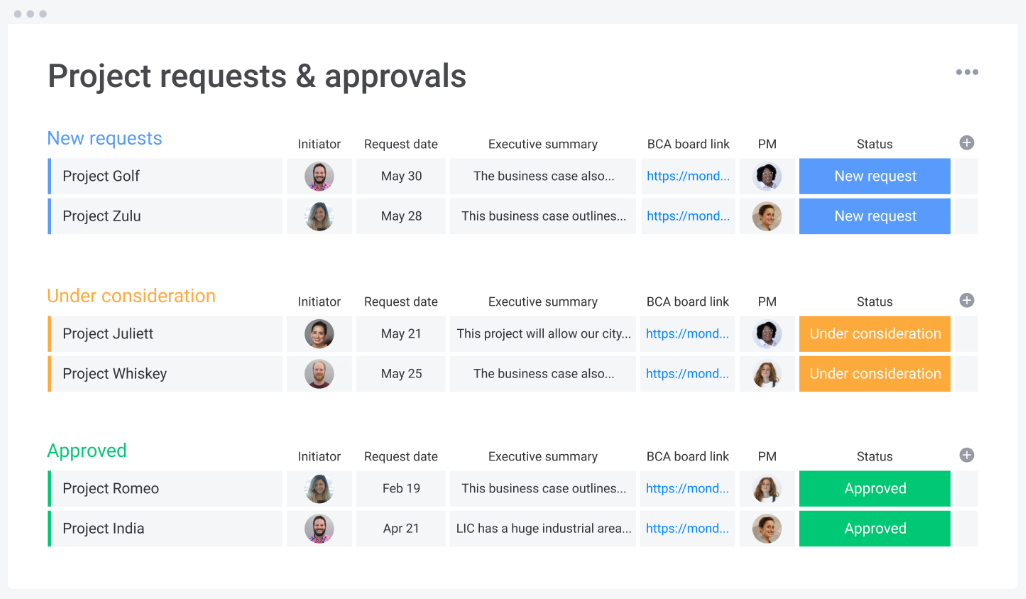
Collect, triage, and assign new project requests using this intake template. Custom forms feed directly into your board with status columns, review ownership, and priority tags.
Why this is effective: Keeps your intake process organized and transparent.
Project Requests and Approvals Template
Pro-Tip: Use status automations to alert stakeholders in real time. A great way to practice good management habits.
7. Project Portfolio Management Template
🏅 Best for: Leaders managing multiple projects across departments.

Monitor project health, status, deadlines, and ownership in one place. PPM templates are a go-to for busy teams who often have to juggle multiple projects at one time. While learning how to prioritize projects is a skill that needs to be honed over time, monday’s PPM template is a great entry point for disorganized managers who need to right the ship.
Why this is effective: It helps you allocate resources strategically, identify at-risk deliverables early, and make informed decisions at a glance. It’s an essential tool for building high-level alignment and improving performance across the entire organization.
Project Portfolio Management Template
Pro-Tip: Customize your dashboard to fit your project’s parameters. You can drag and drop 30+ column types to customize the workflow and set up your ideal PPM template.

8. Content Calendar Template
🏅 Best for: Marketing teams managing campaigns, content pipelines, and tight deadlines.

This monday.com template is built for marketing pros who need to keep multiple content types moving—without dropping the ball.
You can schedule blog posts, newsletters, videos, social media, and ad campaigns all in one centralized calendar. Assign deadlines, attach creative files, flag approval status, and tag team members responsible for each item. Customize views to filter by campaign, content type, or publish date, ensuring every piece lands on time and with the right eyeballs.
Why this is effective: It brings visibility and structure to fast-moving campaigns, helping teams plan smarter and spot potential content gaps before they turn into delays.
Pro-Tip: Set up automations to trigger status changes as you approach publish dates or move from draft to final approval. Want to stay even more efficient?
9. Product Development Template
🏅 Best for: Product teams managing features and releases.

Track ideas, sprints, launches, testing, and feedback. Organize by phase, and link to customer input and dependencies.
Why this is effective: It gives dev, design, and product leads a shared board that acts as the single source of truth—ensuring alignment, faster iteration, and fewer surprises.
Pro-Tip: Link this board to your roadmap and use project scope templates to keep your team focused on what matters most. You’ll spend less time chasing feature creep and more time building what your users actually need.
10. Contacts Template
🏅 Best for: Teams who manage external vendors or clients.

Store and organize key contact info by project or vendor. Tag contacts to associated deliverables or timelines.
Why this is effective: It reduces miscommunication, smooths onboarding, and makes handoffs between team members easier and cleaner. Plus, it’s a smart way to practice better management skills across departments.
Pro-Tip: Link your contacts board to relevant project boards so your team always knows who’s involved, what’s been promised, and when follow-ups are due. You’ll boost transparency—and performance.
Conclusion
Templates aren’t just about saving time—they’re about creating consistency, clarity, and control.
With monday.com ’s library of project management templates, you can bring structure to every phase of your workflow, boost collaboration, and finally take charge of your chaotic task list. monday.com’s powerful framework of boards, columns, and automations ensures your entire team is aligned.
From planning and execution to assigning tasks and tracking progress, monday.com is designed to make project management easier, faster, and actually enjoyable.
Need even more help? Explore project scope templates, work planning guides, or a list of tools that actually work.
P.S. Want more ideas to make project execution smoother? Check out our guides on
Let’s focus on reducing overwhelm before it starts!


